OAuth Token Exchange in Practice: Building a Snake Game


Most OAuth demos are pretty boring. They show a token being issued and then what? You log in, you get a JWT, you decode it on jwt.me, and that's the end of the “excitement”. Here at Duende, we wanted a more playful sample, so we built Snake.
TokenSnake is a browser-based arcade game powered by Duende IdentityServer. Snake's core game loop is a player growing with each pellet they eat. In this case, every pellet your snake eats triggers a token exchange. During gameplay, the browser swaps its current access token for a brand-new one using a custom extension grant. As you level up, your token lifetimes get progressively shorter, and when your token expires before you grab the next pellet, game over!
By the end of this post, you will know how a custom extension grant, a profile service, a per-request token lifetime, and a custom login page fit together, and how you can use these exact same tools in more serious production apps. The full sample lives in the TokenSnake folder of DuendeSoftware/blog-samples.
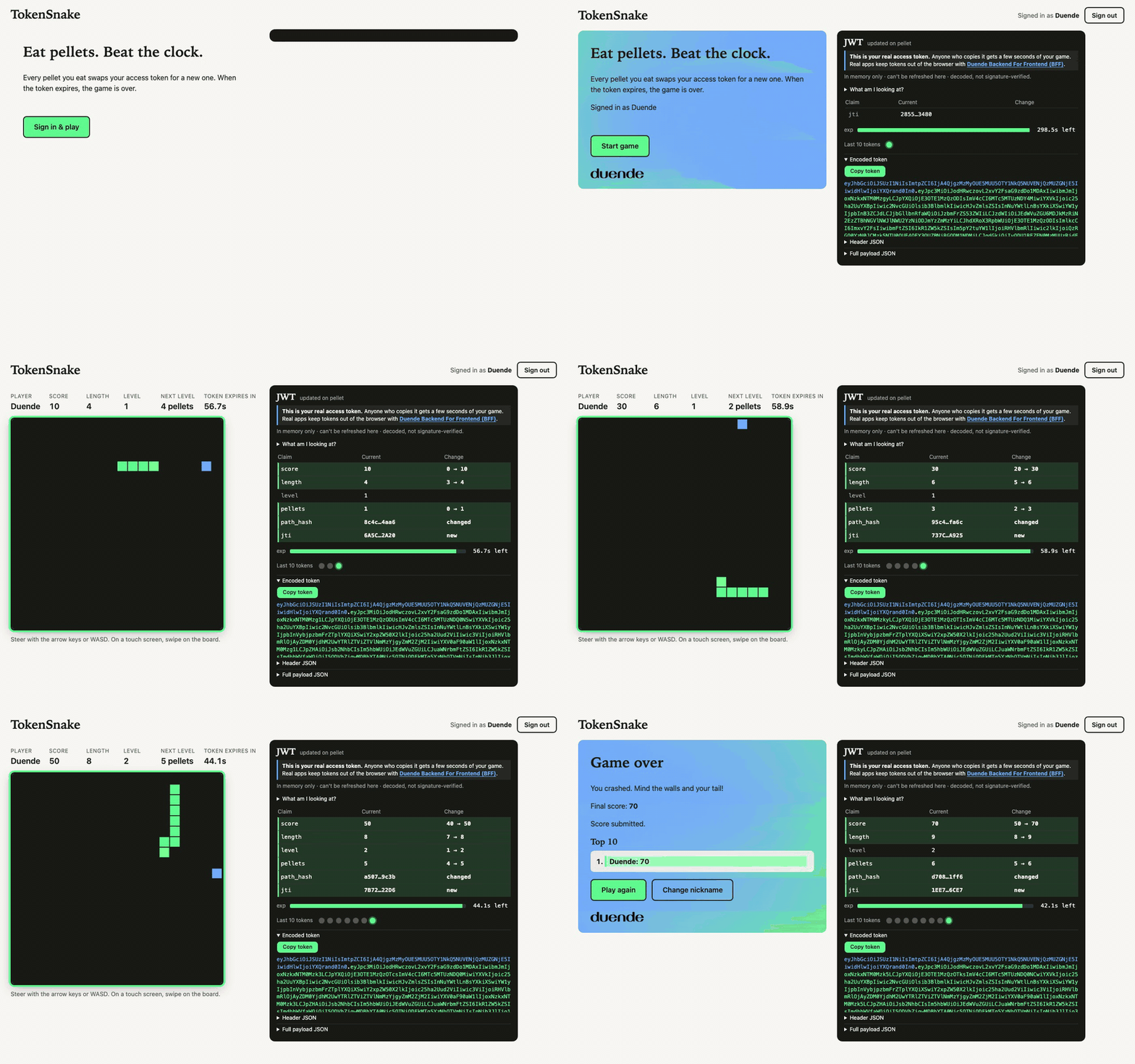
The best way to understand TokenSnake is to try it out! Clone the DuendeSoftware/blog-samples repository and fire up the Aspire AppHost:
Bash
git clone https://github.com/DuendeSoftware/blog-samples.git
cd blog-samples/TokenSnake
dotnet dev-certs https --trust
dotnet run --project src/TokenSnake.AppHost
Then open https://localhost:5002, pick a nickname, and use your arrow keys or WASD to steer.
Why Snake Is a Good OAuth Token Exchange Demo
We needed a game loop where frequent token requests made sense. Snake was a perfect match: eating a pellet is a natural event within the game loop. Consume a pellet, ask the server for a fresh token, and keep slithering. The code is lightweight, easy to inspect, and fast enough to watch claims shift in real time.
More importantly, it puts the token front and center. Higher levels shave seconds off your token's expiration, meaning the token's exp claim controls the game difficulty. Drag your belly for too long, and your next exchange request gets rejected.
How the Token Exchange Game Loop Works
First, you sign in with a nickname on IdentityServer's login page. The game runs as a public client and retrieves a "lobby" access token via Authorization Code with PKCE. Next, the client calls the token endpoint using grant_type=urn:snake:eat and action=start. The server initializes a new game state in memory and hands back a Level 1 access token.
Every pellet triggers another POST request to the token endpoint. The browser submits its current token along with the move sequence recorded since the last pellet. IdentityServer replays those exact moves against its internal board state and only issues a new token if the path was valid and reached the pellet.
The browser never sends its score as a plain integer. When you crash or run out of time, the client sends its final token to the leaderboard endpoint, which extracts and trusts the score directly from the cryptographically signed claims.

Where the Code Lives
To prevent cheating (not that you would, right?), all game logic runs strictly on the server inside TokenSnake.Game. It's a separate library with zero web framework dependencies containing GameRules, PelletGenerator, PathReplayEngine, MoveValidator, and LevelRules. Meanwhile, TokenSnake.IdentityServer handles the urn:snake:eat grant, custom profile service, token lifetime validation, and login UI. TokenSnake.Web delivers the frontend HTML/JS canvas and leaderboard API, while TokenSnake.AppHost ties everything together using .NET Aspire.
The frontend uses an HTML canvas and vanilla JavaScript. It renders movement locally and optimistically grows the snake when it reaches a pellet, pausing briefly for the server's response. Because each token payload delivers tick rates dynamically, the browser never dictates game speed.
IdentityServer stores active games in memory and naturally expires them after 10 minutes of inactivity. The browser is only ever told the immediate pellet location, keeping the secret seed on the backend.
Signing In With PKCE as a Public Client
A browser-based game (or application) can't keep a client secret in the browser. Anything you ship to JavaScript is readable by the player, so the client type is a public client. PKCE (RFC 7636) is what makes the authorization code flow safe in that situation. The app creates a one-time secret, sends only its hash on the authorization request, and proves it knows the original when it redeems the code. In IdentityServer, you turn it on with RequirePkce (see the client reference).
Our game client definition stays minimal: no static secret, PKCE enforced, zero refresh tokens, and allowed grant types limited to code and our custom eat grant. We also configure AllowedCorsOrigins (explained in the CORS guide) so the browser can freely talk to the token endpoint. Check out Config.cs for the full setup:
Csharp
new Client
{
    ClientId = SnakeNames.ClientId,
    ClientName = "TokenSnake",

    // Public client: nobody can keep a secret in a browser.
    RequireClientSecret = false,
    RequirePkce = true,
    AllowedGrantTypes = { GrantType.AuthorizationCode, SnakeNames.EatGrantType },

    // No refresh tokens: an expired token ends the game.
    AllowOfflineAccess = false,
    AccessTokenType = AccessTokenType.Jwt,
    AccessTokenLifetime = 300, // the "lobby" token; the game tokens are shorter
The issued access token is a standard, self-contained JWT, meaning target APIs can validate signatures without network roundtrips. TokenSnake requests the snake.play scope tied to the snake.api resource. (For a refresher on these concepts, take a look at the docs for Claims, API Scopes, and API Resources).
Every Pellet Is a Token Exchange
While standard OAuth defines familiar grants like authorization code or client credentials, extension grants let you introduce custom workflows. RFC 8693 token exchange is a well-known example: you present an existing token to get a new one. This behavior is exactly what our game loop needs.
OAuth specifications require extension grants to be identified by absolute URIs (RFC 6749, Section 4.5). Standard token exchange uses urn:ietf:params:oauth:grant-type:token-exchange, so we named ours urn:snake:eat. Any request with this grant type is dispatched straight to our custom IExtensionGrantValidator implementation: SnakeEatGrantValidator.
Once logged in, the player holds an initial lobby token. Starting the game or eating a pellet sends form-encoded requests to /connect/token, passing the active token as subject_token alongside move history:
Http
POST /connect/token
Content-Type: application/x-www-form-urlencoded

grant_type=urn:snake:eat
&client_id=snake.web
&subject_token=<current access token>
&action=eat
&game_id=<game id>
&pellet_id=<id of the pellet just eaten>
&seq=<sequence number>
&moves=RRUUL
The start action requires only grant_type, client_id, subject_token, and action. Here is how clean the helper logic in auth.js looks:
Javascript
export async function eat({ gameId, pelletId, seq, moves }) {
  return exchange({ action: 'eat', game_id: gameId, pellet_id: pelletId, seq, moves });
}

async function exchange(fields) {
  const cfg = await loadConfig();
  const response = await postToken({
    grant_type: EAT_GRANT,
    client_id: cfg.client_id,
    subject_token: accessToken,
    ...fields,
  });
  setToken(response.access_token);
  return response;
}
Every successful response returns an updated JWT with custom payload parameters: the next pellet's coordinates, the current level, and the updated tick speed.
Why Not Use the Standard Refresh Token Grant?
Standard refresh token grants renew credentials, but they can't validate game data. We needed IdentityServer to verify player move sequences and issue tokens in a single atomic operation. Custom extension grants let you pass specialized parameters like action, moves, and seq without breaking spec compliance.
Refresh tokens would also ruin the game's core challenge! If the client could quietly auto-renew tokens in the background, expiry wouldn't matter. That's why AllowOfflineAccess = false is explicitly set.
The Claims Are the Game State
Game state claims (game_id, score, length, level, pellets, and path_hash) are dynamically injected via a custom Profile Service. Whenever IdentityServer creates a token, it invokes this hook to attach application claims. Because IdentityServer signs the token with its private key, the frontend can read the payload but cannot tamper with its values.

Shorter Tokens, Harder Levels
Token lifetimes scale directly with difficulty. Level 1 tokens last 60 seconds, Level 2 drops to 45 seconds, Level 3 to 30 seconds, and Level 4+ gives you a razor-thin 20-second window! Shorter lifetimes demand faster play. Customizing token lifetimes per request is remarkably straightforward using IdentityServer's ICustomTokenRequestValidator interface (see SnakeTokenLifetimeValidator.cs):
Csharp
public Task ValidateAsync(CustomTokenRequestValidationContext context, CancellationToken ct)
{
    var request = context.Result?.ValidatedRequest;
    if (request?.GrantType != SnakeNames.EatGrantType) return Task.CompletedTask;

    var gameId = request.Subject?.FindFirst(SnakeNames.GameId)?.Value;
    var state = gameId is null ? null : store.Get(gameId);
    if (state is not null)
        request.AccessTokenLifetime = LevelRules.TokenLifetimeSecondsFor(state.Level);

    return Task.CompletedTask;
}
If you don't reach the pellet before the token's exp timestamp passes, your exchange request yields a token_expired error. Note that while standard JWT validation often allows up to 5 minutes of clock skew tolerance, our grant explicitly validates strict expiration to make sure we don't give players five extra minutes of easy gameplay!

How Server-Side Validation Prevents Token Tampering
Simply trusting a client when it says "I ate a pellet" is a huge security hole. To prevent fake requests, every eat call sends the string of movements made since the last pellet (e.g., RRUUL). The server replays these inputs on its own board copy. Wall hits, self-collisions, illegal directional switches, impossible movement speeds, or invalid strings immediately fail. The backend strictly determines collisions.
To prevent replay attacks, each issued token includes a path_hash claim representing the SHA-256 hash of the prior token's hash combined with the new moves. This cryptographically chains every token directly to the preceding move sequence:
Csharp
// The token, the request and the stored game must all name the same player and game.
if (state is null || gameId != token.GameId || state.Subject != token.Sub)
    return Error("unknown_game");

// Each eat must use the token issued by the previous step: an older, still-valid token is stale.
// Rejected without touching the game, like any other stale request.
if (token.PathHash != state.PathHash) return Error("stale_token");

if (!long.TryParse(raw["seq"], out var seq)
    || !int.TryParse(raw["pellet_id"], out var pelletId))
    return Error("bad_input");

var moves = raw["moves"] ?? "";

var result = moveValidator.Validate(state, new EatEvent(seq, pelletId, moves), token.Expiry, time.GetUtcNow());

// A stale request leaves the game alone. A cheat or a collision ends it.
if (result.Outcome == EatOutcome.Rejected) return Error(result.Reason!);
If a user attempts to reuse a valid, non-expired token from earlier in the game, the request fails with stale_token. You can't branch game states or replay historic good paths because your token cryptographically encodes your exact trajectory.
How the Leaderboard Knows Your Score Is Real
When your game finishes, the browser posts its latest token to the web host. The leaderboard endpoint completely ignores the HTTP request body! It validates the incoming bearer token (verifying signature, issuer, and audience using JWT validation against IdentityServer's discovery keys) and reads the player's score directly from the verified claims (see LeaderboardApi.cs):
Csharp
app.MapPost("/api/leaderboard", (ClaimsPrincipal user, LeaderboardStore store) =>
    {
        // The request body is ignored on purpose: everything comes from the signed token.
        var gameId = user.FindFirstValue("game_id");
        var sub = user.FindFirstValue("sub");
        if (gameId is null || sub is null || !int.TryParse(user.FindFirstValue("score"), out var score) || score < 0)
            return Results.BadRequest(new { error = "token_has_no_game" });

        // Stored raw. It is only ever exposed as JSON, and the client renders it with textContent.
        var nickname = user.FindFirstValue("nickname") ?? "anonymous";
        var best = store.Submit(new LeaderboardEntry(sub, gameId, nickname, score, time.GetUtcNow()));
        return Results.Ok(new { score = best });
    })
    .RequireAuthorization(Policy);
The board only retains a player's high score, so submitting an older token won't overwrite a better run. And since games routinely end on token expiration, the endpoint allows a grace window of up to two minutes past exp for final score submission.
An interactive JWT panel sits alongside the board, decoding token updates after every pellet so you can watch claims update in real time. It displays a visual expiration countdown bar, an audit trail of the last ten tokens, and color-coded headers, payloads, and signatures.

Signing In With Just a Nickname
Our first version had demo users and a normal login form. It worked, but a password has no business in a game of Snake, so we replaced it with a nickname-only login. There are no passwords and no user store now. The login page is a Razor page hosted inside IdentityServer, and it asks for a nickname.
IdentityServer doesn't force you to use a specific user database. All it cares about is that your login page eventually calls SignInAsync with a valid IdentityServerUser object. Everything prior to that call is under your complete control! Check out the docs for Customizing Login Pages and Login UI.
Csharp
    // Two logins with the same nickname are different players, so every sub gets a fresh GUID.
    var sub = $"{nick}:{Guid.NewGuid():N}";
    var user = new IdentityServerUser(sub)
    {
        DisplayName = nick,
        AdditionalClaims = { new Claim("name", nick), new Claim(SnakeNames.Nickname, nick) },
    };
    await HttpContext.SignInAsync(user);

    return Redirect(ReturnUrl!);
}
Every login appends a fresh GUID to the nickname to generate a unique sub claim. That means two different people using the handle "Ada" get isolated game sessions and separate leaderboard entries without needing persistent user storage.
IdentityServer maintains session state using a standard authentication cookie, so you stay signed in between games. Signing out redirects the browser to the end-session endpoint with id_token_hint, where a custom page clears the cookie (see the Logout UI docs). We bypassed the typical logout confirmation screen here because losing a temporary nickname session has no real consequences.
Transforming the authenticated user into token claims is handled by our custom IProfileService implementation (SnakeProfileService.cs):
Csharp
public Task GetProfileDataAsync(ProfileDataRequestContext context, CancellationToken ct)
{
    var subject = context.Subject;
    var sub = subject.FindFirst("sub")?.Value ?? "";
    var nickname = subject.FindFirst(SnakeNames.Nickname)?.Value ?? Nickname.FromSubject(sub);

    var claims = new List<Claim> { new("name", nickname), new(SnakeNames.Nickname, nickname) };
    claims.AddRange(GameClaims(subject, sub));

    // Only the claims the requested scopes ask for end up in the token.
    context.AddRequestedClaims(claims);
    return Task.CompletedTask;
}
The user's name and nickname claims come directly from the principal, while game state claims are pulled dynamically from our in-memory game manager. The exact same hook you'd normally use to query a SQL database or Active Directory fetches our game engine state here!
That flexibility is what makes IdentityServer so powerful. You control the authentication workflow, user domain, token parameters, and custom extension grant handlers end to end.
How About Adding Backend for Frontend (BFF)?
When building modern browser applications with Duende, we strongly recommend the Backend for Frontend (BFF) pattern. A BFF securely stores tokens on the server, manages secure HTTP-only cookie sessions with the browser, and silently refreshes tokens behind the scenes. For production web apps, it's the gold standard. Explore the BFF Product Page, BFF Documentation, and Token Management Guide to learn more.
So why didn't we use a BFF for TokenSnake? Because automatic silent token refresh would completely destroy our game mechanics! An arcade game where tokens never expire isn't very challenging. So we intentionally chose a public-client architecture: short-lived tokens stored only in JS memory, no refresh tokens, and strict expiration rules. Reloading the page simply resets your session.
Please don't use this memory-only SPA pattern for real business applications! See RFC 10017, our blog post on BFF becoming official IETF guidance, and How BFF Secures SPAs for complete security breakdowns.
What You Would Do Differently in a Real App
Duende IdentityServer operates as a framework embedded directly inside your ASP.NET Core solution. You retain full control over authentication UI, domain models, custom claims, expiration policies, and grant types. TokenSnake uses fun game mechanics to demonstrate these extensibility points: IExtensionGrantValidator processes input moves, IProfileService generates dynamic claims, ICustomTokenRequestValidator enforces per-level expiration, and custom Razor pages deliver custom UI. In enterprise applications, these exact same extensibility points connect IdentityServer to user databases, legacy systems, multi-factor step-up flows, or partner APIs.
Keep token generation authority on the server, and ensure APIs validate claims thoroughly. Keep token lifetimes short, especially for public clients that cannot hold secrets. And if you must run public clients without a BFF, drop refresh tokens and consider adopting DPoP to cryptographically bind tokens to client keys.
Where These Ideas Show Up in Business Apps
- API-to-API Delegation & Impersonation: Use custom extension grants via
IExtensionGrantValidatorto exchange user tokens between internal microservices. The Extension Grants documentation details how anactclaim establishes delegation chains. - Customer Support Overrides: Allow support agents to safely perform actions as a user through token exchange, recording audit trails using the
actclaim. - Legacy & Partner Migration: Accept legacy session tokens or third-party partner credentials at your token endpoint and issue standardized internal JWTs in return.
- Step-Up Authorization: Require secondary approvals or MFA confirmation before issuing tokens containing elevated permission scopes.
- Dynamic Domain Claims: Implement
IProfileServiceto pull user roles, tenant IDs, and feature flags directly into access tokens. - Custom Authentication Experiences: Build magic link, passwordless, or custom biometric login pages that complete seamlessly with
SignInAsync.
Limits of This Sample
Because TokenSnake is designed as a sample, we intentionally stripped out production boilerplate like strict rate limiting, complex proxy configurations, and persistent key storage to keep the codebase focused and approachable.
In-memory games clean up automatically after 10 minutes of inactivity, but there are no caps on total game instances or IP rate limits. If you deploy this publicly, place a gateway or rate limiter in front of it. Also note that server-side validation verifies path legality, not human input. A fast bot can still compute valid paths and score high points!
Everything runs in memory: signing keys, active sessions, game states, and leaderboards. Restarting the process resets state completely. When hosting behind reverse proxies, ensure headers like X-Forwarded-Proto and X-Forwarded-Host are forwarded so IdentityServer constructs accurate HTTPS authority URIs (see Proxy and Load Balancer Docs).
Finally, closing the game tab doesn't notify the server. Inactive games simply expire quietly in the background without affecting leaderboard integrity, since scores are extracted exclusively from signed tokens.
Run It Yourself
If you haven't already, give it a try! Clone the repository, run the AppHost commands shown above, and navigate to https://localhost:5002!
The .NET Aspire launcher starts IdentityServer on https://localhost:5001 and the web app on https://localhost:5002. Aspire makes orchestration convenient, but if you prefer running services manually across two terminals, just execute:
Bash
dotnet run --project src/TokenSnake.IdentityServer
dotnet run --project src/TokenSnake.Web
Should you deploy this sample directly to production? No. TokenSnake is an educational demonstration built with in-memory state and no rate limits. Do borrow the architectural concepts.
If you use these patterns to build something cool, like a custom grant or specialized login workflow, we'd love to hear about it! To learn more about taking full control over identity, claims, and token issuance in your own apps, explore Duende IdentityServer and the IdentityServer Documentation.
Related Articles
- AL Rodriguez
-
- Joe DeCock
-
- Maarten Balliauw
-